• About
  • Advertise
  • Careers
Wednesday, May 20, 2026
  • Login
No Result
View All Result
NEWSLETTER
Bizmart Africa
  • Home
    • Home – Layout 1
    • Home – Layout 2
    • Home – Layout 3
    • Home – Layout 4
    • Home – Layout 5
  • World
  • Politics
  • Business
  • Science
  • Tech

    Trending Tags

    • Sillicon Valley
    • Climate Change
    • Election Results
    • Flat Earth
    • Golden Globes
    • MotoGP 2017
    • Mr. Robot
  • Entertainment
  • Lifestyle

    Trending Tags

    • Golden Globes
    • Mr. Robot
    • MotoGP 2017
    • Climate Change
    • Flat Earth
  • Home
    • Home – Layout 1
    • Home – Layout 2
    • Home – Layout 3
    • Home – Layout 4
    • Home – Layout 5
  • World
  • Politics
  • Business
  • Science
  • Tech

    Trending Tags

    • Sillicon Valley
    • Climate Change
    • Election Results
    • Flat Earth
    • Golden Globes
    • MotoGP 2017
    • Mr. Robot
  • Entertainment
  • Lifestyle

    Trending Tags

    • Golden Globes
    • Mr. Robot
    • MotoGP 2017
    • Climate Change
    • Flat Earth
No Result
View All Result
Bizmart Africa
No Result
View All Result
Home How to

How to Transfer WhatsApp Chat History on Android Phone

by Nyongesa Sande
3 years ago
in How to
Reading Time: 2 mins read
A A
How to Transfer WhatsApp Chat History on Android Phone
Share on FacebookShare on Twitter

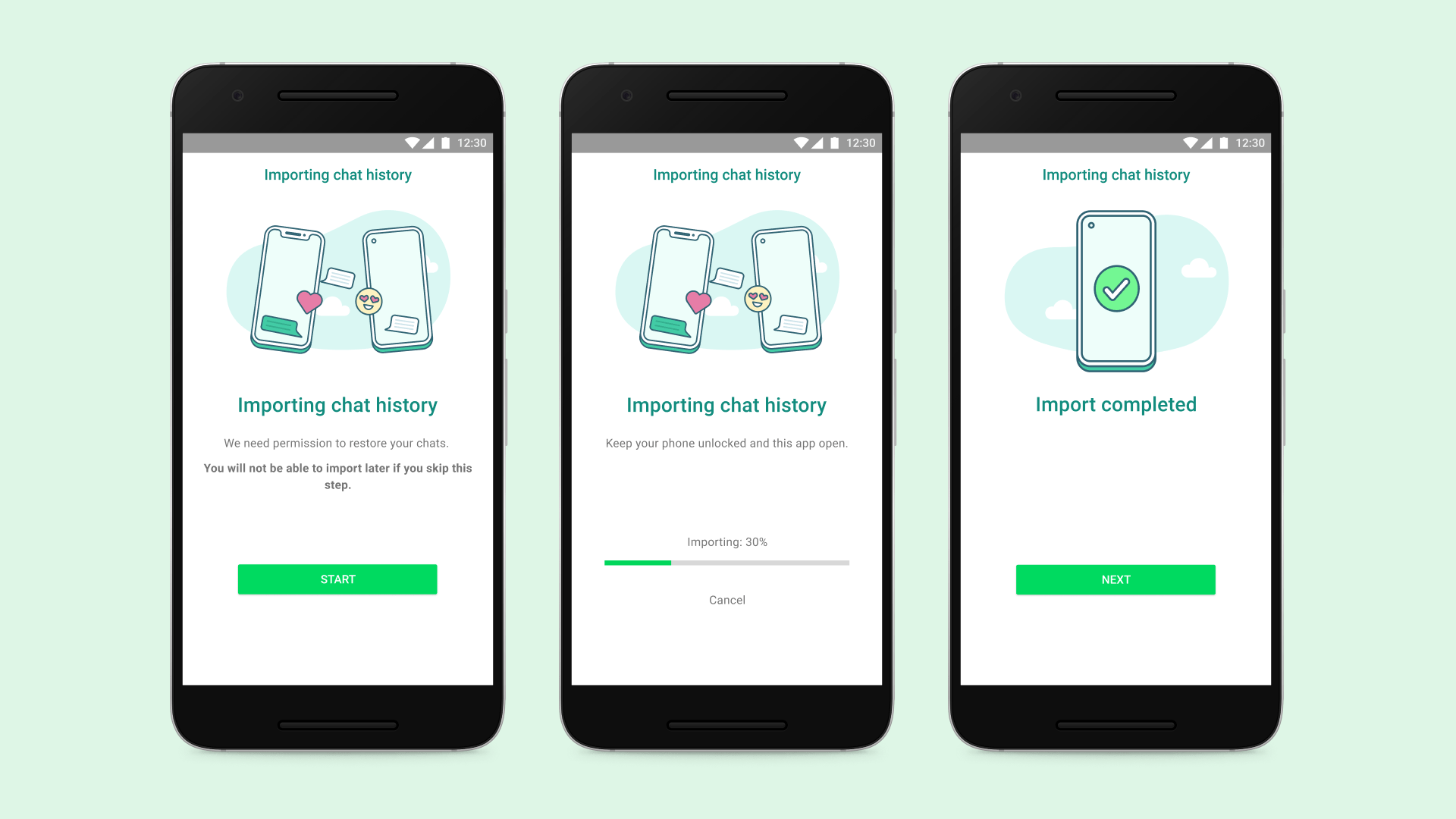
How to Transfer WhatsApp Chat History on Android Phone. Meta, in a recent announcement, made it easier for WhatsApp users to transfer their chat history from an old phone to new phone without the use of any backup or cloud services. WhatsApp now allows Android as well as iOS users to transfer their chat history, along with media attachments, between phone running on the same OS. While the instant messaging service already had an option for transfer of chat history, it needed either backing up the chat history on storage or uploading it to the cloud.

WhatsApp’s new chat transfer feature, using QR code, lets users transfer most chat information like messages, and media files including documents, links and videos. However, users will not be able to transfer details on peer-to-peer payment messages and call history.To transfer the WhatsApp Chat History via QR code, the user needs to assure that both their phones have Android OS Lollipop 5.1, or Android 6 or above installed on them. The new phone shouldn’t be registered on WhatsApp until the transfer process. Both handsets also need to have their WiFi enabled and on the same network.

Here is How to Transfer WhatsApp Chat History on Android Phone

  • Open WhatsApp on old phone. Go to More Options > Settings > Chats > Transfer chats > Start.
  • On the new handset, install and register on WhatsApp using the same number.
  • Select Start on Transfer chat history from old phone.
  • Allow the permissions and a QR code will appear. Scan this code using your old device.
  • Once the permission for connecting phone is granted, the process will begin.
  • As the import is finished, tap Done.
Post Views: 83
Tags: Transfer WhatsApp Chat History on Android
Nyongesa Sande

Nyongesa Sande

Nyongesa Sande is a seasoned writer, editor, and digital publisher passionate about delivering high-quality, SEO-optimized content across diverse fields including politics, technology, culture, business, and sports. As the founder and driving force behind NyongesaSande.com, he has built a trusted platform that blends in-depth reporting with accessible storytelling, making complex issues understandable to a broad audience. With a strong background in East African and global affairs, Sande is dedicated to providing readers with accurate, engaging, and impactful insights that both inform and inspire.

Next Post
How to Transfer WhatsApp Chat History on iOS device

How to Transfer WhatsApp Chat History on iOS device

How to manage Threads notifications on Android

How to manage Threads notifications on Android

  • About
  • Advertise
  • Careers

© 2026 Bizmart Africa

Welcome Back!

Login to your account below

Forgotten Password?

Retrieve your password

Please enter your username or email address to reset your password.

Log In
No Result
View All Result
  • Home
  • Politics
  • World
  • Business
  • Science
  • National
  • Entertainment
  • Gaming
  • Movie
  • Music
  • Sports
  • Fashion
  • Lifestyle
  • Travel
  • Tech
  • Health
  • Food

© 2026 Bizmart Africa