Containers and virtual machines are technologies that make your applications independent from your IT infrastructure resources. A container is a software code package containing an application’s code, its libraries, and other dependencies. Containerization makes your applications portable so that the same code can run on any device. A virtual machine is a digital copy of a physical machine. You can have multiple virtual machines with their own individual operating systems running on the same host operating system. In addition, you can create a virtual machine that contains everything required to run your application.
Where are containers and virtual machines used?
Containers and virtual machines are both deployment technologies. In the software development lifecycle, deployment is the mechanism that makes an application run efficiently on a server or device. The application requires several additional software components called dependencies that are closely related to the underlying operating system of the server. All these different software layers between the application code and the physical device are called the application environment.
Challenges in software deployment
Organizations typically have to deploy applications in multiple environments—for example, developing on the Linux environment and testing on Windows—before releasing new features. Moving the application between environments can result in bugs and glitches, which lower productivity, due to missed dependencies. At the same time, building and testing the application in just one environment limits its usefulness. Here are some examples:
- You may have to develop different versions for users with different operating systems
- Your system administrators must update and maintain all environments uniformly, increasing development costs
- You may find it challenging to move your applications from on-premises data centers to the cloud or between different cloud environments
Purpose of virtual machines
Historically, virtual machine technology was developed to efficiently use increasing physical hardware capacity and processing power. Running a single application environment on a single physical server underutilized hardware resources. Virtual machines allow organizations to install multiple operating systems and create multiple environments on the same physical machine.
Purpose of containers
Containers were created to package and run applications in a predictable and repeatable way across multiple environments. Instead of recreating the environment, you packaged the application to run on all types of physical or virtual environments. This is similar to putting an astronaut in a spacesuit instead of recreating the Earth’s atmosphere for them on another planet.
Similarities between containers and virtual machines
Containers and virtual machines allow for the full isolation of applications so that you can run them in multiple environments. They virtualize or abstract underlying infrastructure, so users don’t have to worry about that. They also allow you to package your software infrastructure into a single file called an image file. You can use the image file to quickly set up and run your application anywhere. In addition, you can also use software processes to manage system configurations or scale to manage thousands of applications at once. However, the role and extent of use for containers and virtual machines vary depending on where and how the application is deployed.
Key differences: containers vs. virtual machines
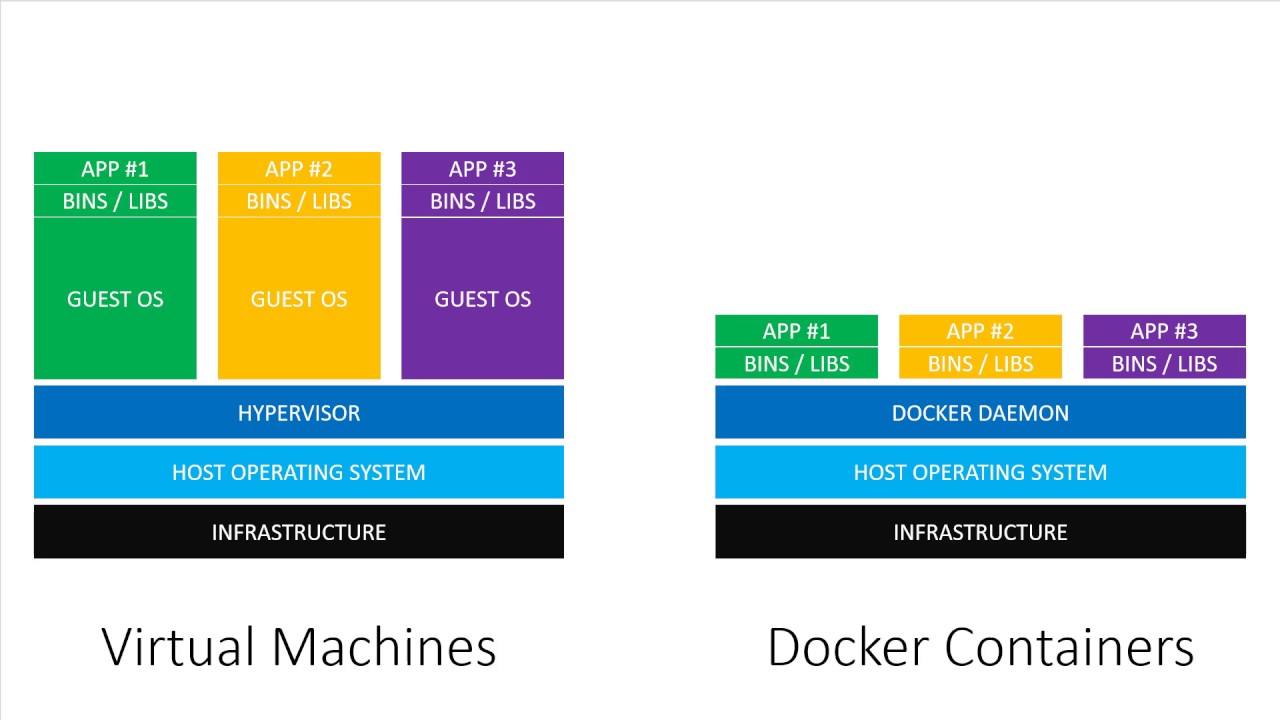
Containers virtualize the operating system so the application can run independently on any platform. Virtual machines go beyond that to virtualize physical machines, so you can use your hardware resources efficiently. We give some more differences below.
How they work
Container technology involves building self-sufficient software packages that perform consistently, regardless of the machines they run on. Software developers create and deploy container images—files containing the necessary information to run the application. Container images are read-only and cannot be altered by the computer system.
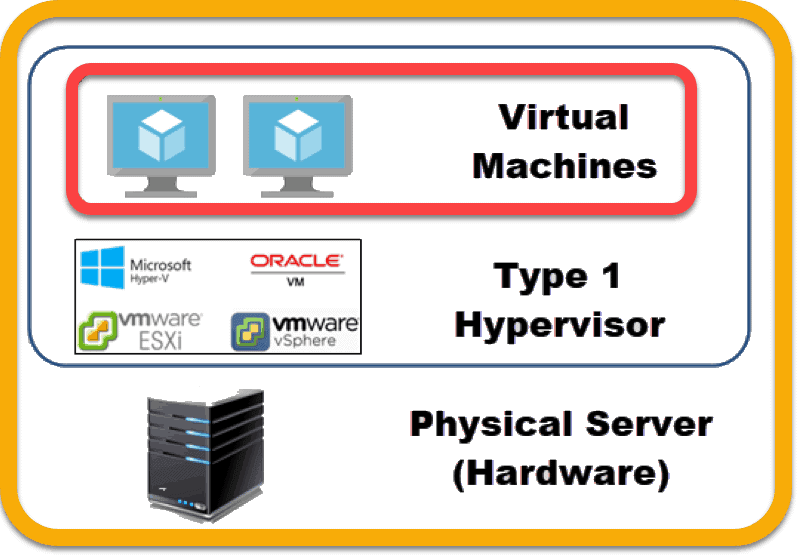
Virtual machine technology involves installing virtualization software on a physical server or computer. The physical computer is called the host computer and the virtual machine is called the guest. You can configure and update the guest operating system and its applications as necessary without affecting the host operating system.
Core technology
Virtual machines use hypervisors that communicate between the guest operating system and the host operating system. The hypervisor coordinates resource sharing, so the virtual machine runs in isolation alongside several others on the same hardware.
Containers, on the other hand, use a container engine or container runtime. This is software that acts as an intermediary agent between the containers and the operating system, providing and managing system resources that the application needs. Docker is the most popular open-source container engine.
Size
Virtual machine image files are larger in size (several GB) as they contain their own operating system. Increased resources mean you can duplicate, split, abstract, and emulate entire servers, databases, desktops, and networks. Container files are more lightweight, and you can measure them in MB. Containers only package the resources required to run a single application.
When to use containers vs. virtual machines
Here, we give some factors to consider when choosing between virtual machines and containers for application deployment.
Environment configuration
Virtual machines give developers more control over the application’s environment. They can manually install system software, snapshot configuration states, and restore them to a previous state if required. They are useful for ideation and experimentation or for testing different environments to improve an application’s performance.
Containers provide static definitions of configurations once the best ones have been selected.
Software development speed
Virtual machines are full-stack systems and can be laborious to build and regenerate. Any modifications are time-consuming to validate as you have to regenerate the environment.
Containers are a better choice if you want to build, test, and release new features frequently. As they only include high-level software, they are very fast to modify and iterate on.
Scalability
Virtual machines take up more storage space and require you to provision more hardware in your on-premises data centers. Switching to cloud instances reduces costs but migrating your entire environment brings its own challenges.
Containers take up less space and are easier to scale. More importantly, containers provide granular control on application scalability by allowing you to use microservices. Microservices are an architectural and organizational approach to software development where software is composed of small independent services that communicate over well-defined APIs. Containers let you scale individual microservices as required.