How to Improve GoPro Battery Life. As any camera buff must surely know by now, GoPro is one of the best action cams you can get in today’s market and it could get even better if you could somehow enhance its battery life. Thankfully there are certain GoPro settings which can be tweaked to maximize the GoPro battery life and in this article we are going to discuss a few easy ways of improving your GoPro battery life. On an average the battery of your GoPro would last just for about 1 ½ hours or even less while shooting in 4K with the LCD screen on and Wi-Fi connected.
You may also like:
Batteries and Chargers for GoPro Hero5 >>
How to Improve GoPro’s Battery life
1. Update the firmware
Are you still not taking the firmware updates of your camera seriously? Though most action camera shooters do not have the time to ponder over all those tech stuff, yet you need to keep your camera’s firmware updated if you are looking forward to conserving your battery. There is always a possibility that your GoPro firmware isn’t actually updated. Doing this would not just fix any recurrent problems which you might be having with your camera but it would also improve the battery life immensely because of any fixes implemented by the company. The GoPro firmware can be updated by connecting the cam to a smartphone over Wi-Fi and then by updating it with the help of the GoPro app. In case you are using an older model you have to download the firmware which is available on the GoPro website and then transfer it to your GoPro SD card and run the update from your cam.
2. Keep the cam turned off when not in use
This sounds pretty obvious doesn’t it? When you turn on your camera but not recording anything then the battery gets drains slowly. So make sure to keep your GoPro switched off whenever you are not shooting so as to save the battery. The Quick Capture is an useful feature which allows the cam to start recording instantly whenever it is powered on.
3. Use the “Auto Power Off Setting”
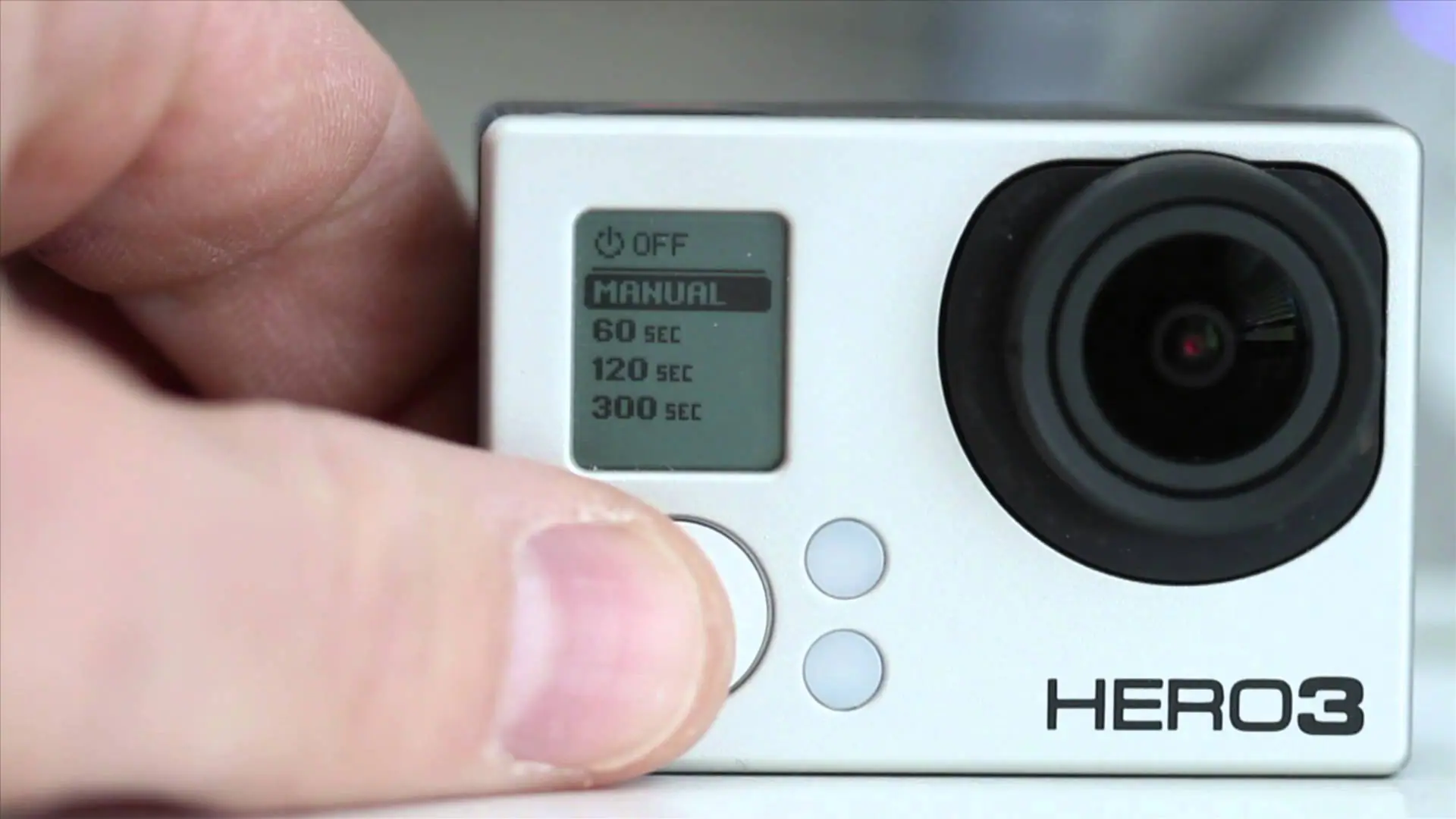
Many of us forget to switch on our cameras after shooting and this slowly depletes the camera’s battery. If you are one of those people who always forget to turn off the camera only to find a low battery indication after some time then what you need to do is turn on the ‘Auto Power Off Setting’. All you have to do is go to the settings menu and then click on the button 13 times till you have the option to select the number of seconds you would like to give your cam till it shuts down automatically. You can choose from 60, 120, and 300 seconds.

4. Turn off the red indicator and beeping lights
The red light which constantly blinks while shooting a footage is not just a major distraction to the viewer but also a cause of battery drainage. This red indicator light is meant for letting the user know when the cam is recording. However professional cinematographers will easily learn that as long as the record button is pressed properly the GoPro is going to start shooting no matter if the red light is blinking or not. Though the light indicator doesn’t have that much of an impact on the overall battery life but when it comes to battery life improvement every little thing helps.
5. Turn off the Wi-Fi and Bluetooth
Just like any other devices, turning off the WIFI and Bluetooth in your GoPro cam can greatly help to enhance the battery life. Turning of these 2 could extend your battery life by about 10-15 minutes. Make sure not to accidentally press the WIFI button at the side of your camera while shooting.
6. Give up the Remote and the smartphone app
The remote control of your GoPro is not just difficult to use but also takes a toll on the battery life of the camera. It could lower the overall battery life of your cam by about 15%-20% depending on the usage. Try using a selfie stick instead of the remote. Avoid pairing your cam with your phone since it’s more of a wastage of your time and the camera battery. So leave the remote behind and stop playing with your smartphone so as to shoot a lot more footage with your GoPro.
7. Reduce the frame rate or the recording resolution
Always keep in mind that the less the number of pixels and frames your camera is recording the less battery it uses. Try to have the video setting of your GoPro set to 1080p but for a special reason to shoot in ultra HD. Also make sure to turn off the Protune feature in your camera. The 1080p at 60 fps is the norm for shooting any GoPro footage. However you can always reduce it to 720p or leave it at 1080p only with 30 frames per sec instead of 60 unless you are shooting a professional video with the best possible res. If you are just shooting for fun then 720p is surely going to work great and more importantly it would give you more footage in the end.
8. Keep the LCD screen turned off
The LCD screens in the new GroPro are a superb feature which not only allows you to see whatever you are recording but also change the setting more conveniently. However the LCD screen can substantially drain the battery so when you want to capture more footage its best for you to turn off the LCD and shoot in the old school way.
9. Get extra batteries or an extended battery pack
Surely this is one of the easiest ways of getting the most out of your GoPro camera. You can just buy a few spare batteries from the 3rd party vendors at a very affordable price so that you don’t have to worry about shooting to your heart’s content.